FFidèlPro
Features

Everything FidèlPro does, screen by screen.

A loyalty card on your customers' phones, with no app to download. Here is every feature explained simply, with a screenshot of the app exactly as you and your customers will see it.

01Zero apps for your customersOne QR code, and the card opens on their phone. iPhone and Android.
02Ready in minutesNo hardware to buy: your phone is enough to validate visits.
03Fraud-proofA PIN that changes every 5 hours, reward codes that only work once.
04Customers who come backNotifications, follow-ups, birthdays and referrals work for you.
05Results in eurosEvery month, the visits brought back and what they earned you.
06No commitment, GDPR compliant30-day free trial, cancel in one click. Your customers stay yours.
01 — For your customers

A card they always have on them, with nothing to install.

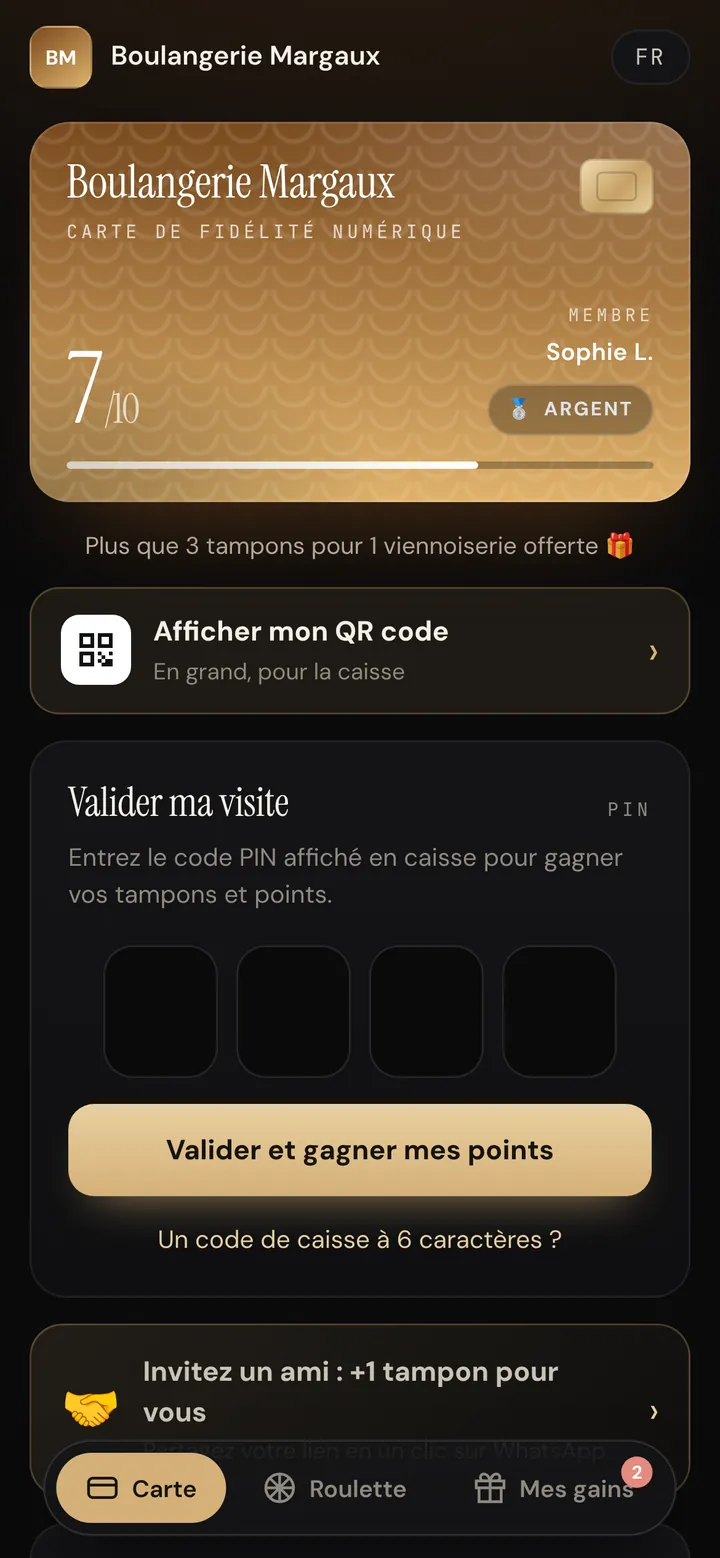
FidèlPro loyalty card open on a phone: 7 stamps out of 10, the customer's first name and a button to show their QR code
Essential and Pro

A real card on the phone, no app needed

Your customer scans your QR code and their card opens in the browser. They can add it to their home screen like an app, and it still works without signal.

  • Nothing to download from the App Store or Google Play
  • Works on iPhone and Android
  • The card is available in French, English, Spanish and Portuguese
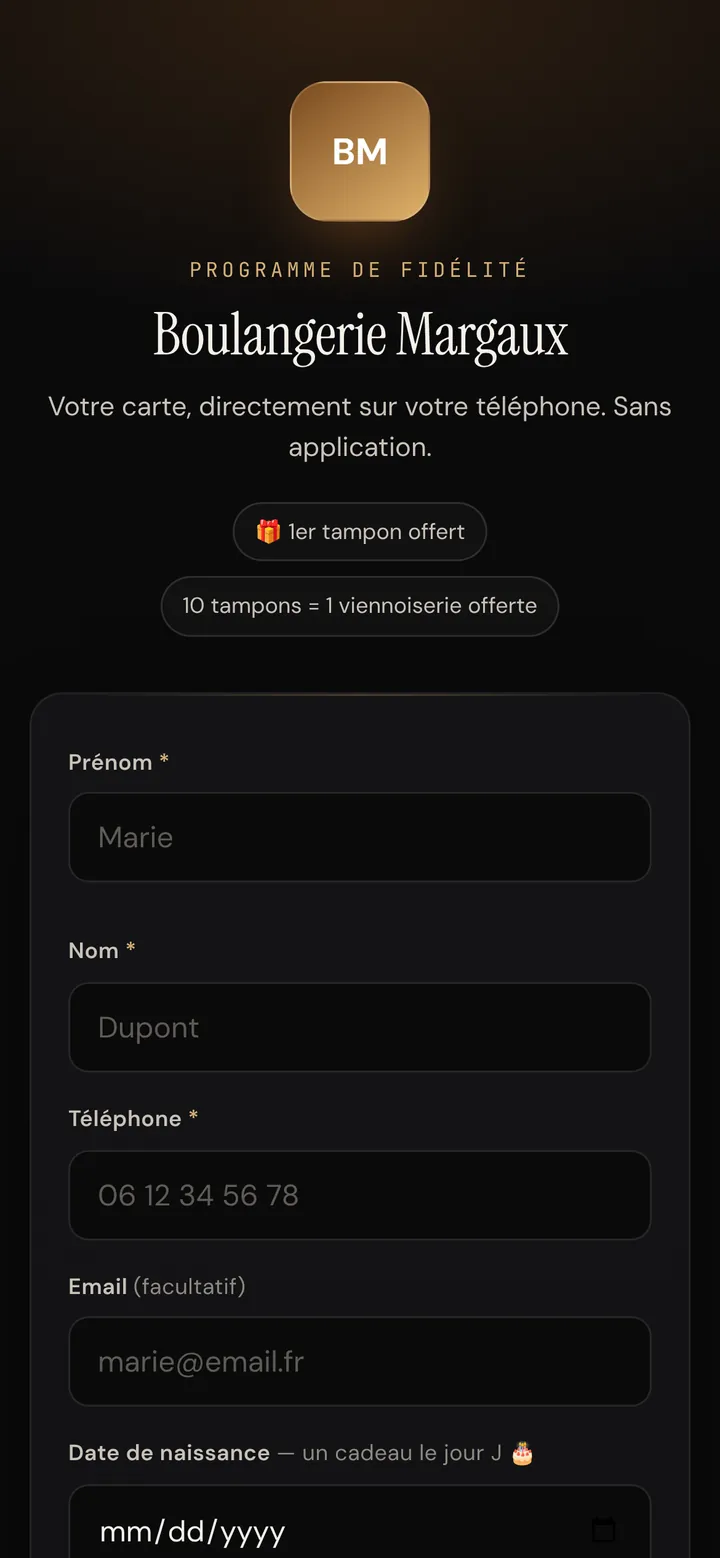
Sign-up page for the Boulangerie Margaux loyalty programme: first name, last name, phone, date of birth
Essential and Pro

Sign up in 30 seconds with a QR code

The QR code on your counter leads to a sign-up page in your name. The customer enters their first name, last name and phone number, and leaves with their card. You can also create a card yourself from your dashboard.

  • First stamp free on sign-up
  • Optional date of birth, for the birthday gift
  • GDPR consent recorded automatically
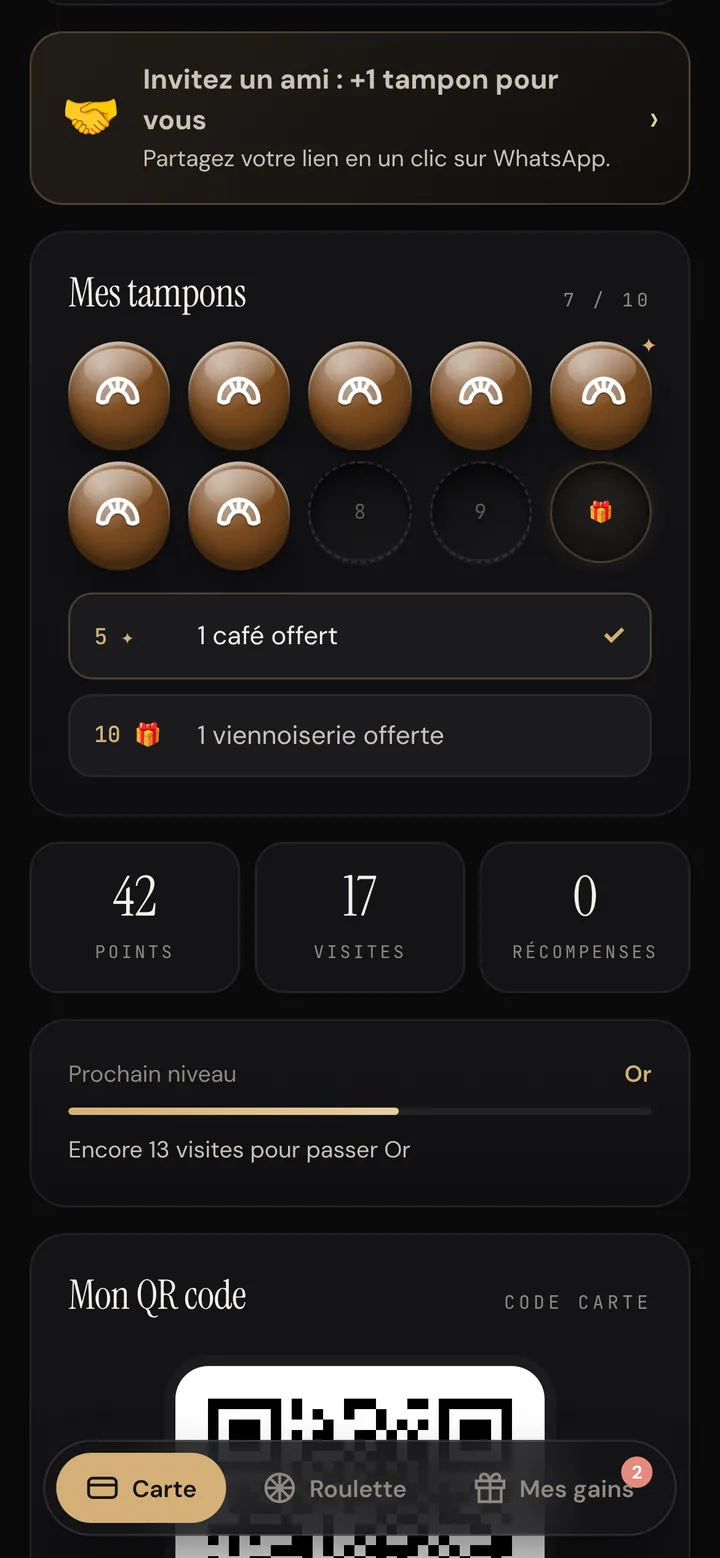
Customer card with 7 stamps out of 10, a « free coffee » level at 5 stamps, 42 points and 17 visits
Essential · Pro options

Stamps, reward levels, points and tiers

You choose the number of stamps and the final reward. Add intermediate levels (a coffee at 5 stamps, a pastry at 10) so the customer always has a gift in sight.

  • Stamps and reward levels included in every plan
  • Points on top of stamps, per visit or based on the amount spent (Pro)
  • Bronze, Silver and Gold tiers based on the number of visits
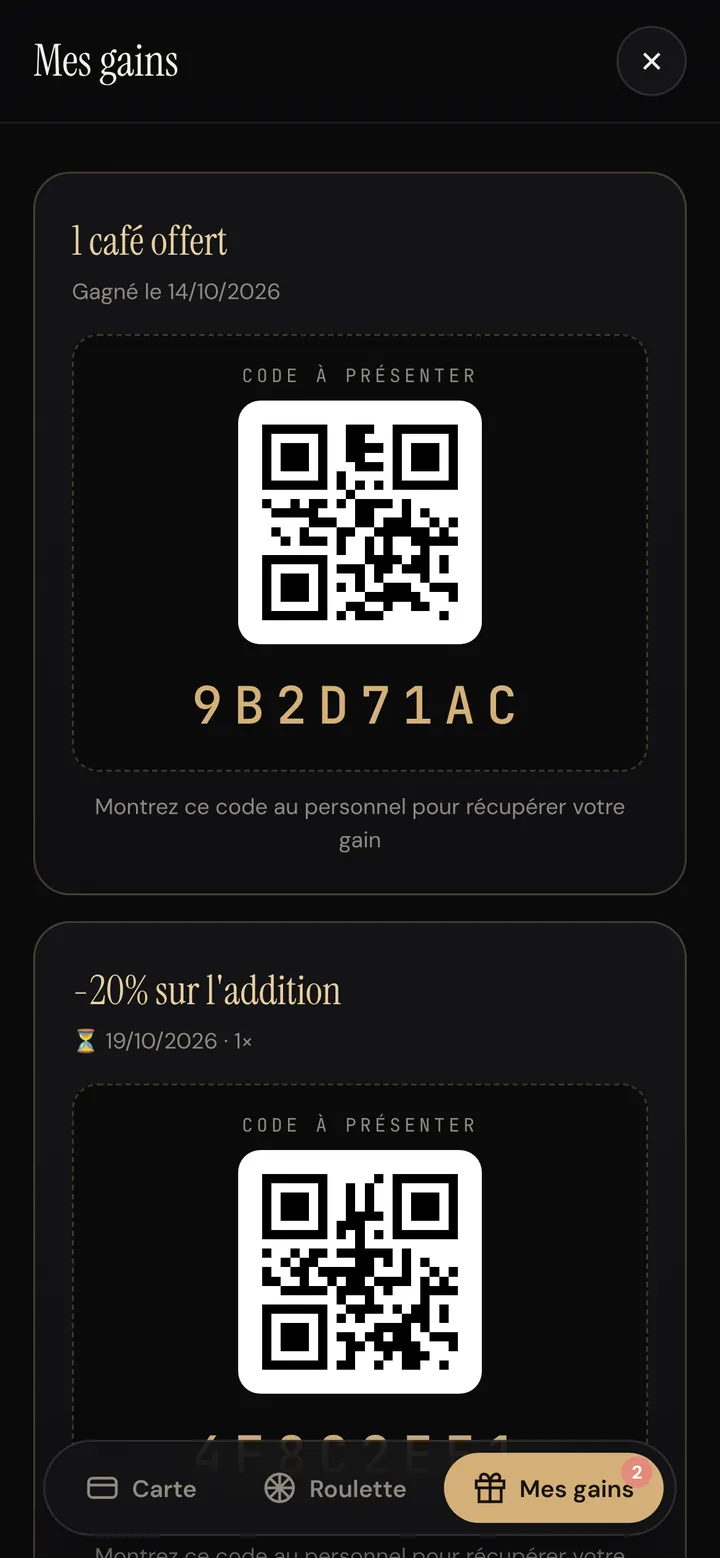
« My rewards » tab on the customer card: a free coffee and 20% off the bill, each with a QR code to show
Essential and Pro

Rewards protected against fraud

Every reward earned lands in the « My rewards » tab with a QR code and an 8-character code. It only works once: a screenshot shared between friends is refused the second time.

  • One unique code per customer and per reward
  • Expiry date shown on offers
  • You keep a history of redeemed rewards
02 — At the till

Validating a visit takes two seconds, with or without your till software.

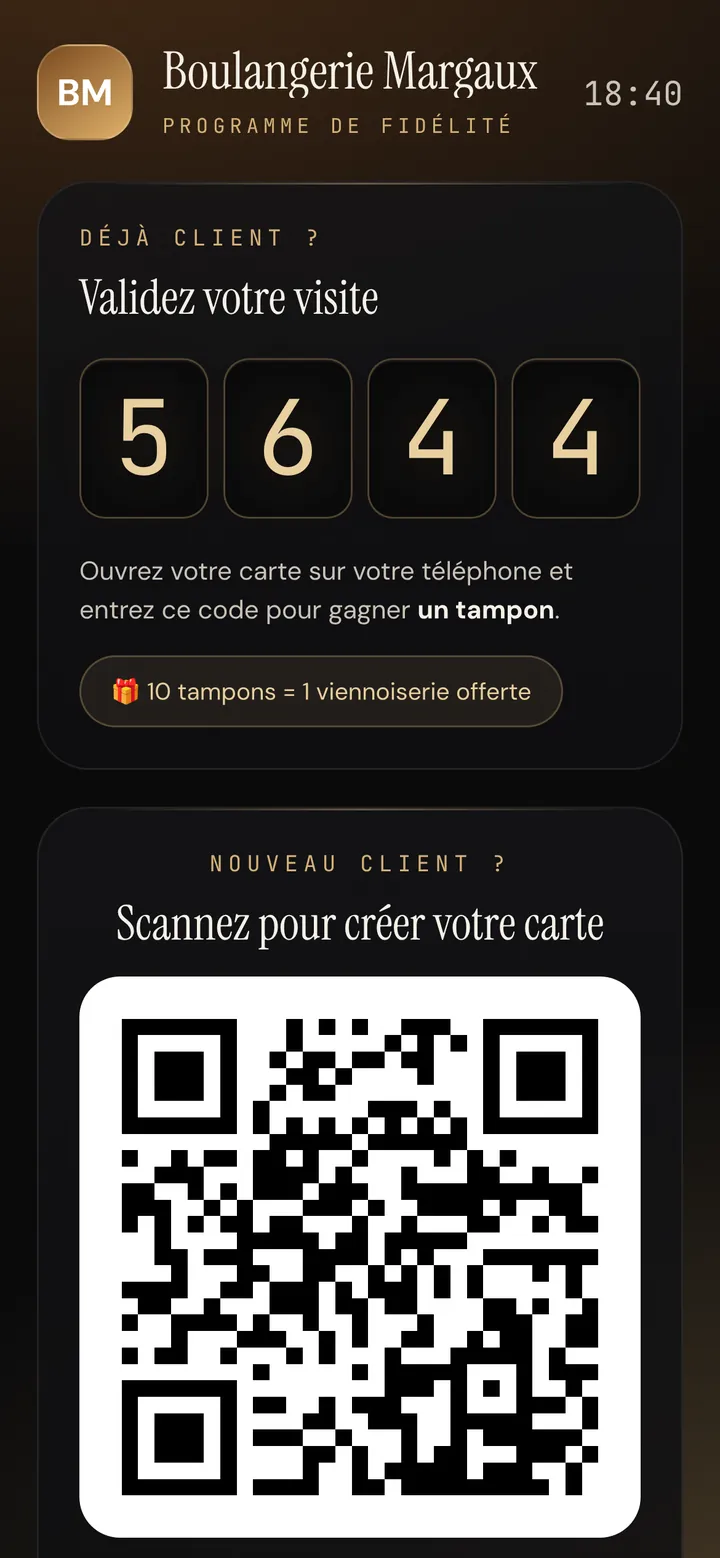
Counter mode on a tablet: today's PIN 5644 and a sign-up QR code for new customers
Essential and Pro

Daily PIN and counter mode

The simplest way to validate a visit: the customer types the PIN shown at the till into their card. The code changes every 5 hours. Put an old tablet or phone in counter mode and it shows the PIN and the sign-up QR code all the time.

  • Nothing for you to do during the rush
  • One stamp per customer per day, to prevent abuse
  • The PIN is also shown in your dashboard
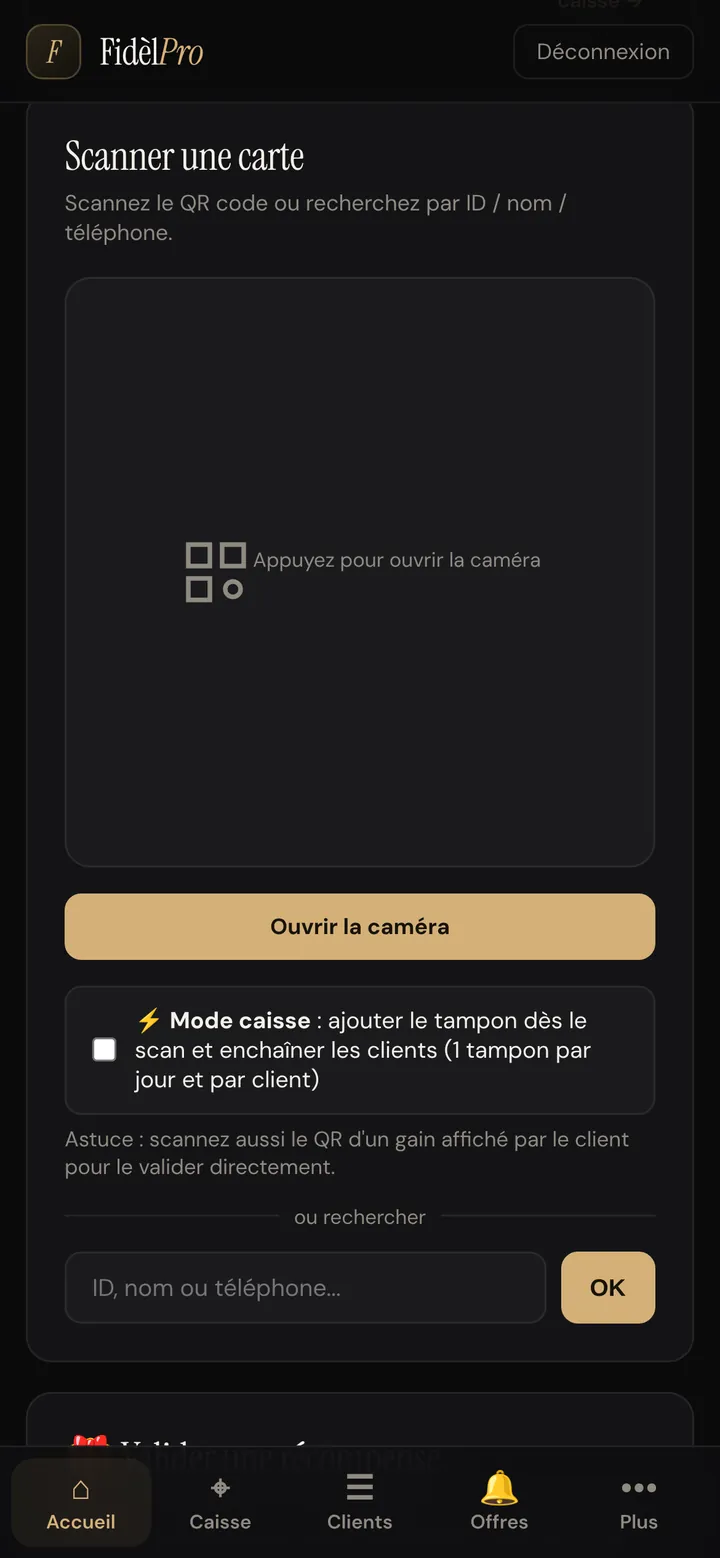
Card scanner in the merchant dashboard, with the « Till mode » option and search by name or phone
Essential and Pro

Scan the card with your phone

Prefer to stay in control? Scan the customer's QR code with your phone's camera. Till mode gives the stamp as soon as you scan and moves on to the next customer.

  • Search by name or phone if the customer forgot their phone
  • Redeem rewards by scanning their QR code
  • Works on iPhone and Android
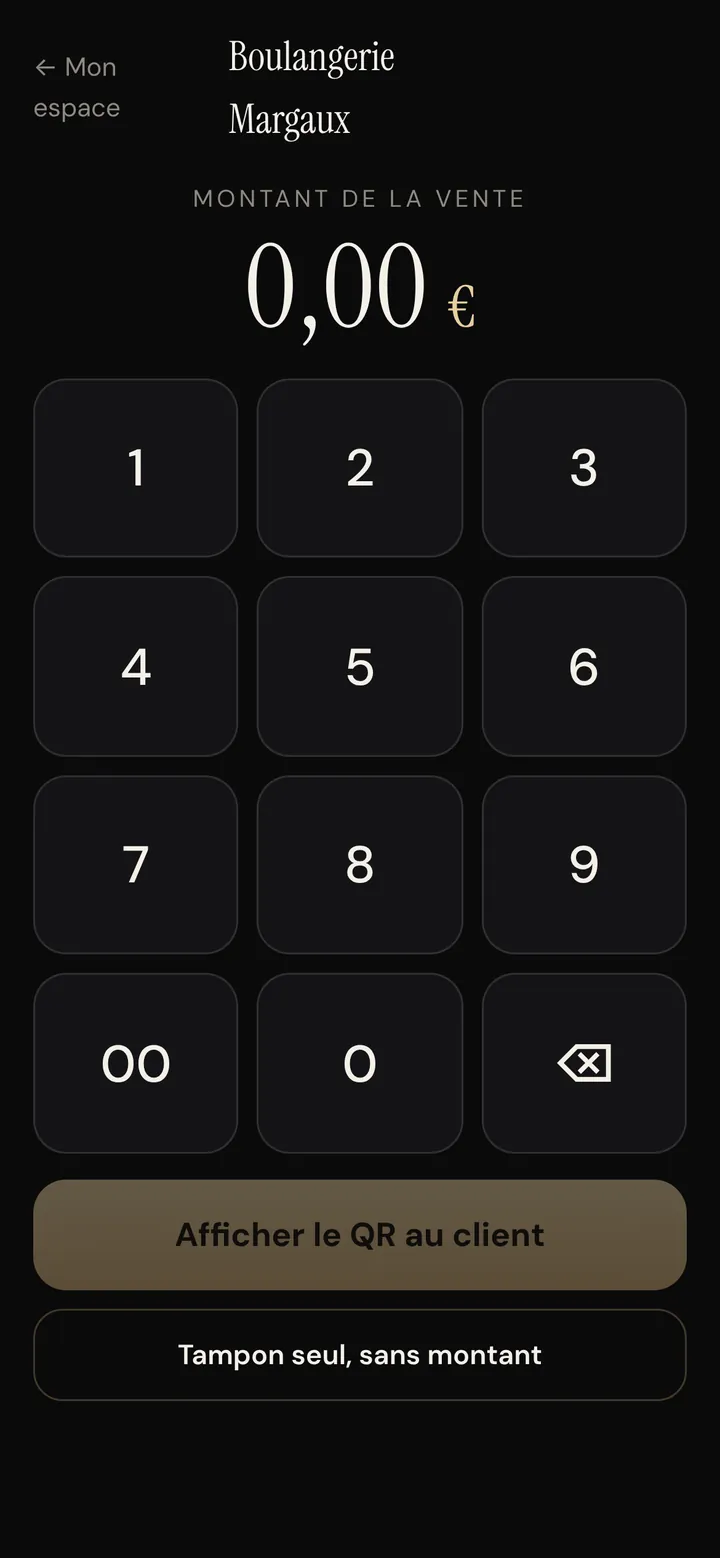
FidèlPro till screen: keypad to enter the sale amount and a « Show QR to customer » button
Essential and Pro

Till screen: the amount, then a QR code

Next to any till, with nothing to plug in: you type the sale amount, the customer scans the QR code with their phone, and the sale lands on their card (amount, stamp, points). Not signed up yet? They sign up on the spot.

  • Each customer's spend is recorded
  • QR code valid only once
  • Also works as « stamp only, no amount »
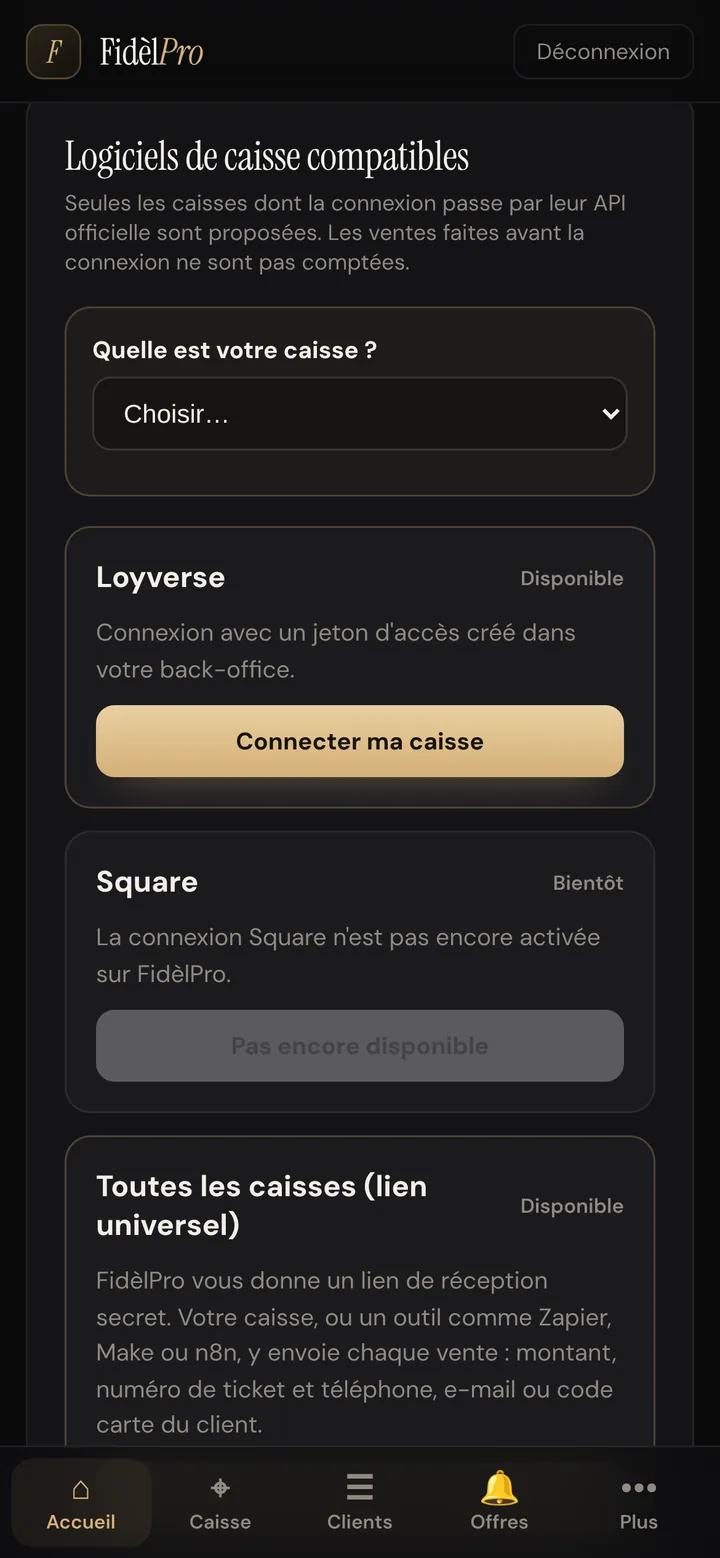
« Compatible till software » screen: Loyverse available, Square coming soon, universal link for every till
Essential and Pro

Connect your till software

If your till allows it, every sale is sent to FidèlPro and the customer's card updates itself. Loyverse connects in one click; other tills use a universal link (Zapier, Make, n8n). You can also import a CSV or Excel export.

  • Customer recognised by phone or email
  • Each sale is only counted once
  • Sync history available
03 — Bring customers back

The tools that bring people in when it's quiet.

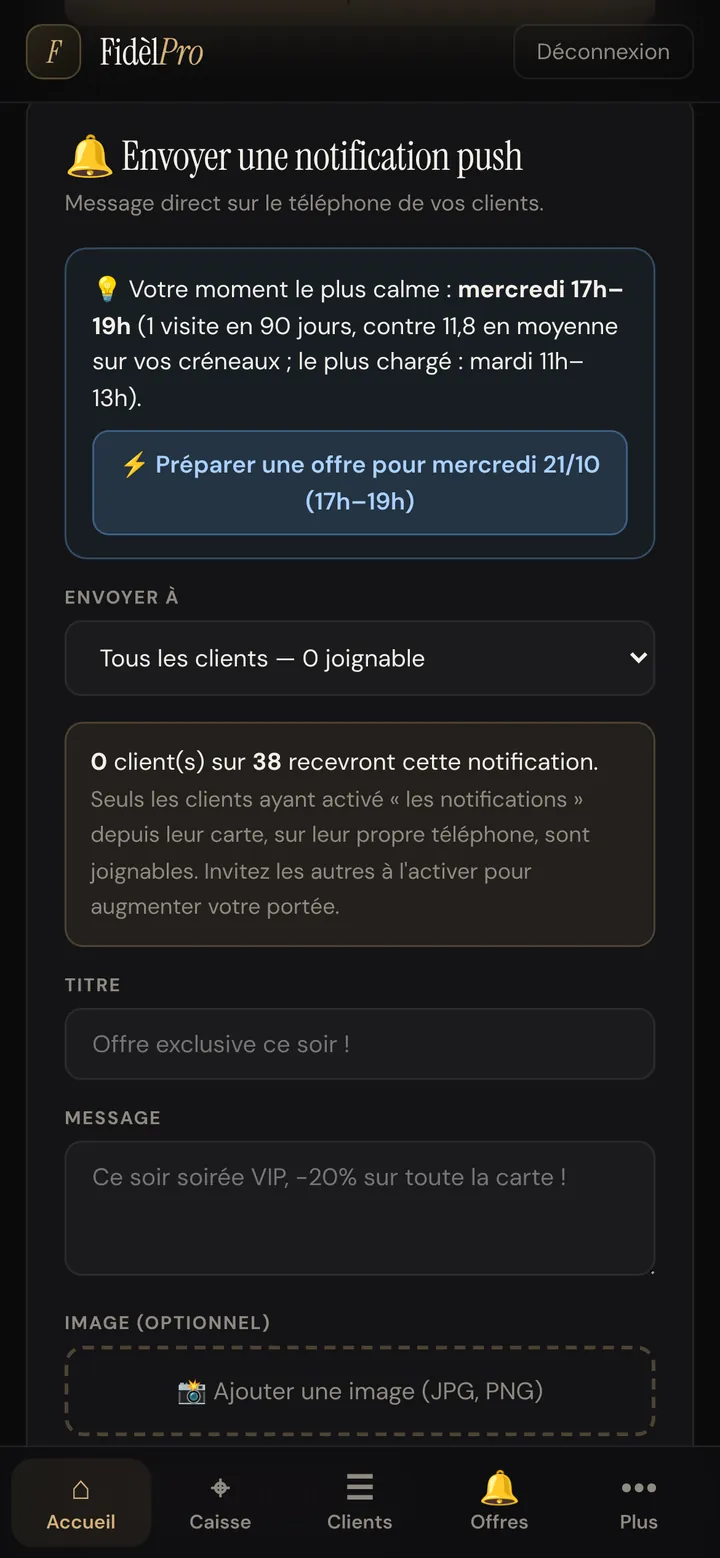
Notification form with the suggestion « Your quietest time: Wednesday 5–7 pm » and the button to prepare an offer
Pro plan

Notifications with photos, flash offers and quiet hours

Write a message, add a photo and a gift: it appears on your customers' phones like an app notification. FidèlPro spots your quietest time slot of the week and suggests the offer to go with it.

  • Send now or schedule, to everyone or to a group
  • « First 20 only » flash offers with a live counter
  • Included and unlimited: no cost per text message
  • Received by customers who turned on notifications on their card
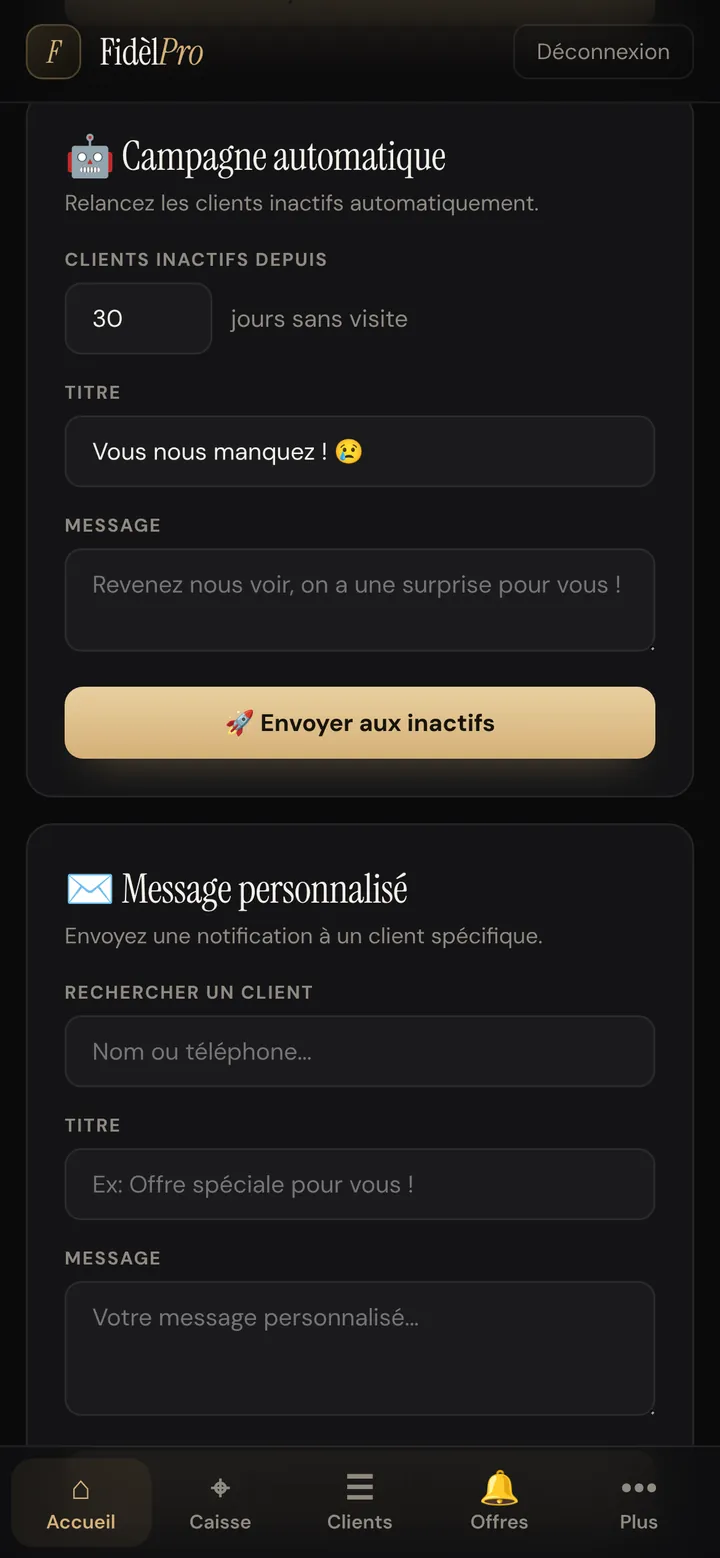
Automatic campaign setting: follow up customers inactive for 30 days with the message « We miss you »
Pro plan

Automatic follow-up for customers who stopped coming

A customer hasn't been back for 30 days (or the period you choose)? They automatically get a short note, with a gift if you like. You can also write to a specific customer.

  • Set it once, it runs by itself
  • Each customer is followed up at most once a month
  • The customer's return is counted in your results
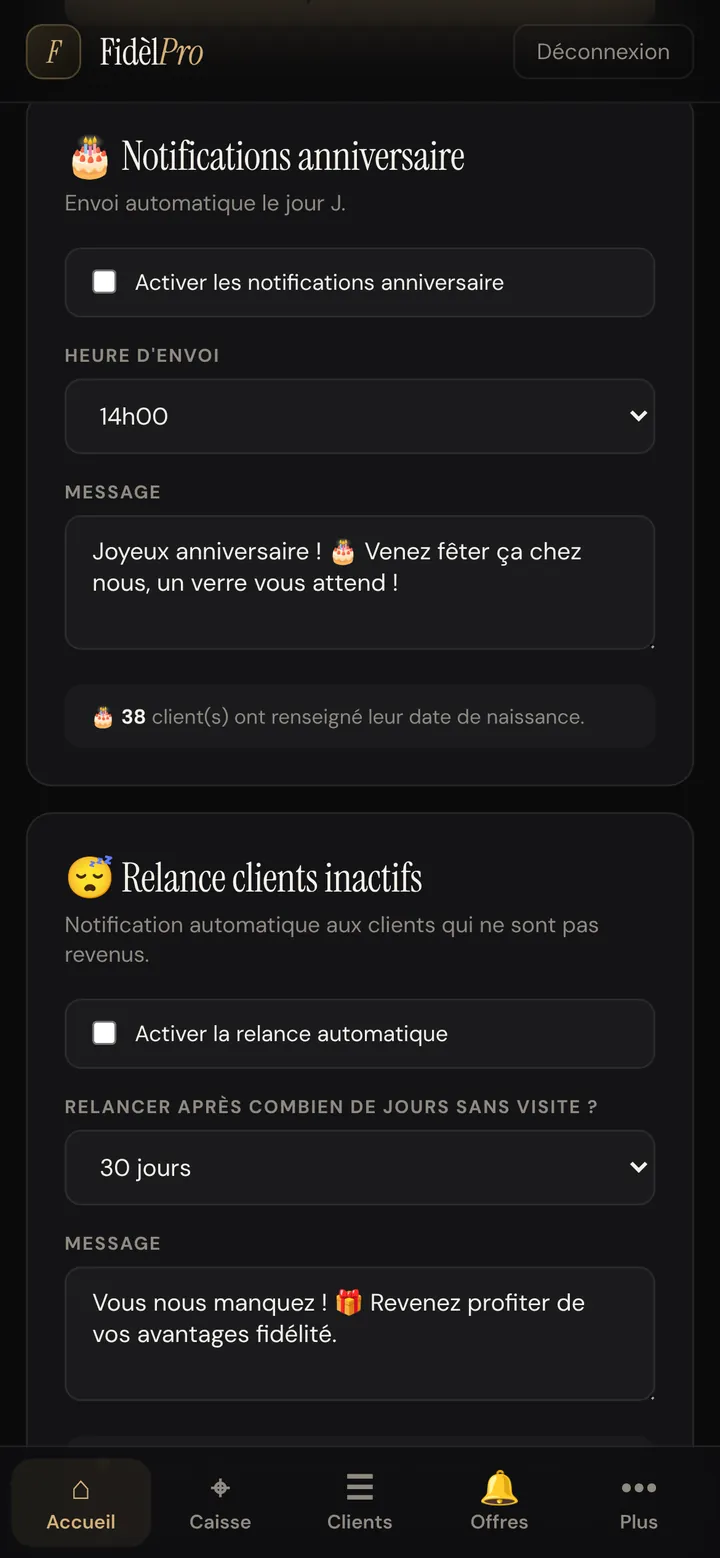
Birthday notification settings: sent at 2 pm with the message « Happy birthday! Come and celebrate with us »
Pro plan

The birthday gift, sent automatically

On the day, at the time you choose, your customers receive a birthday message signed by your business. It's the most opened message of the year.

  • Message and sending time as you like
  • You see how many customers gave their date
  • Nothing forgotten, even while you're on holiday
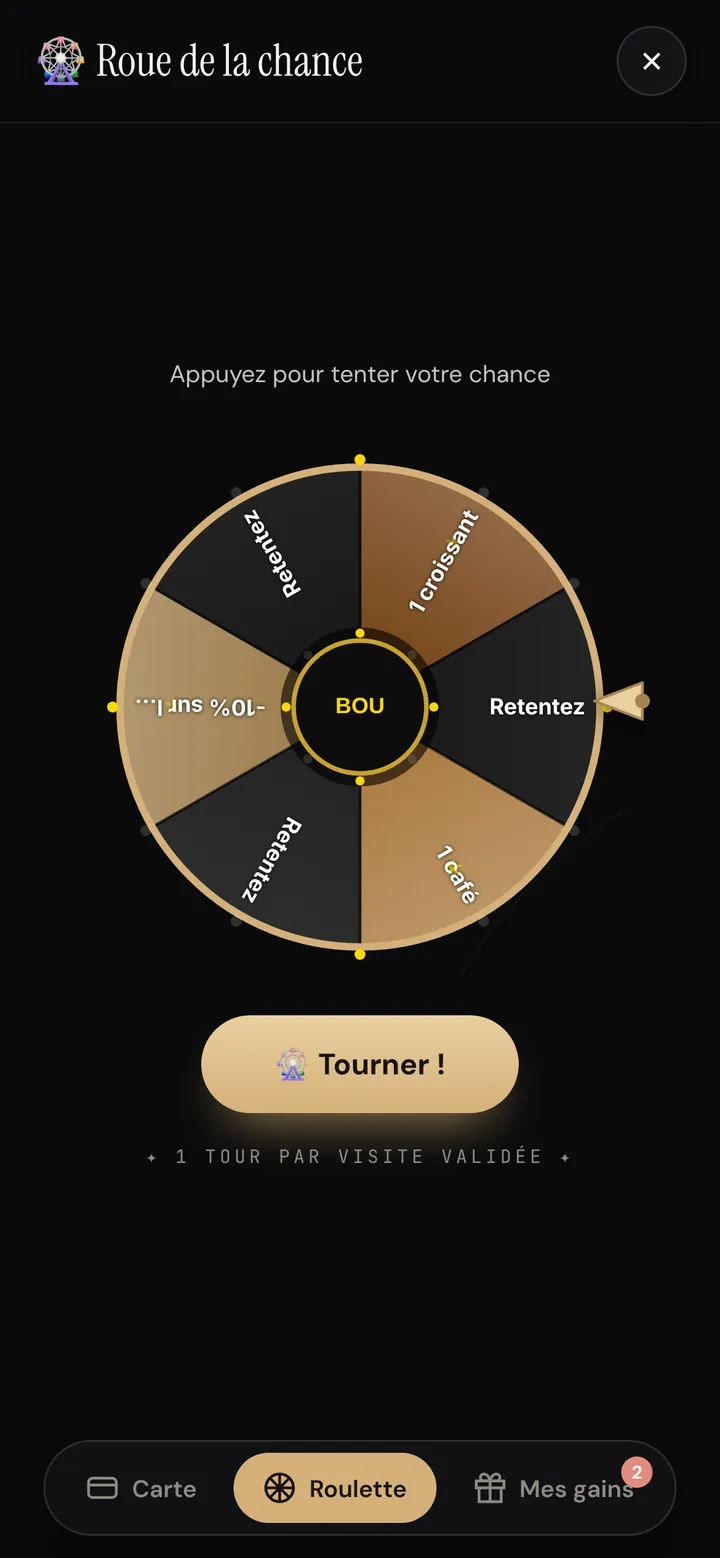
Wheel of fortune on the customer card with croissant, coffee and 10% off prizes and the « Spin » button
Pro plan

Wheel of fortune

After a validated visit, the customer tries their luck. You choose the prizes and how often they win (for example 1 winner in 20). The prize lands in « My rewards » with its unique code.

  • One spin per validated visit
  • Adjustable prizes and odds
  • Statistics on spins and prizes won
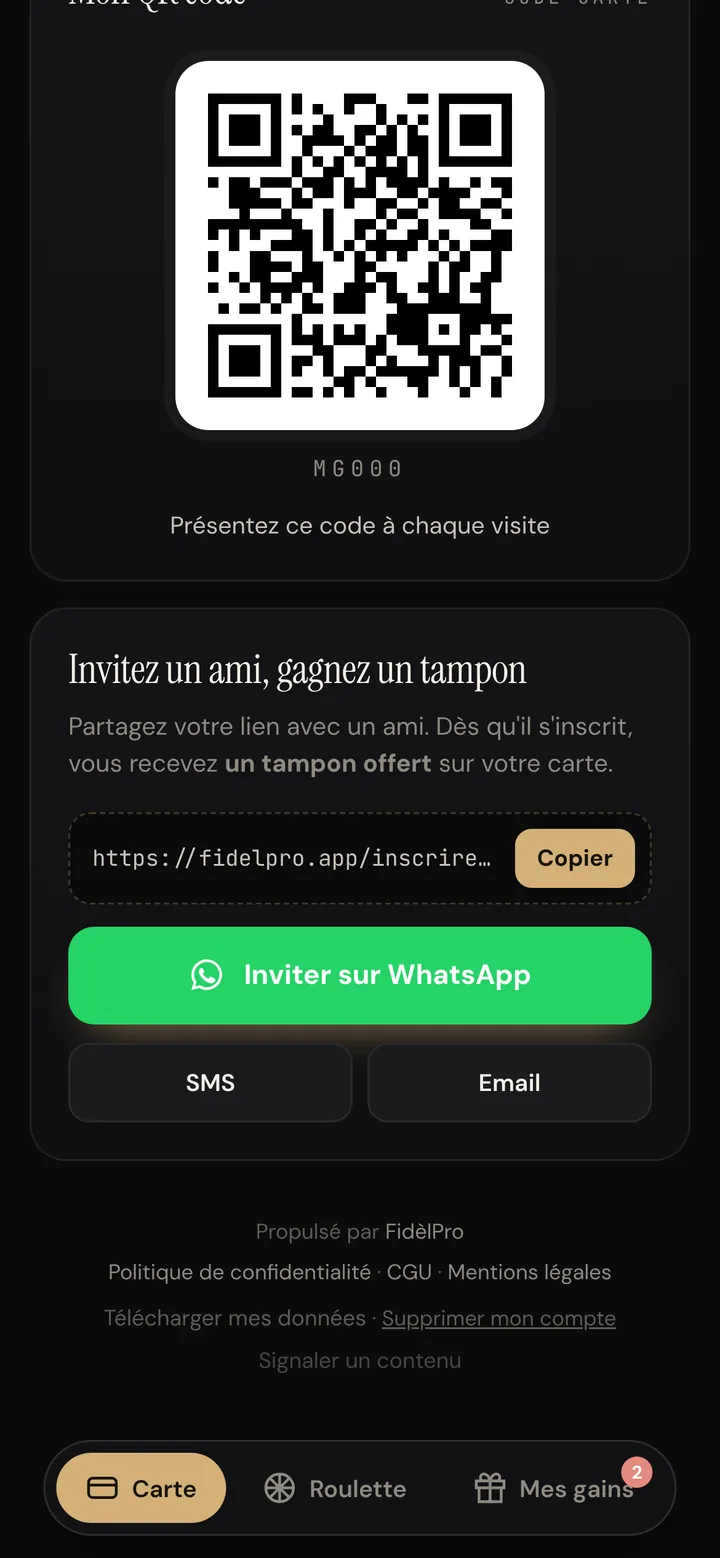
« Invite a friend, earn a stamp » block on the customer card, with a link to copy and a WhatsApp button
Pro plan

Referrals via WhatsApp

Every customer has their own invitation link. They send it to a friend on WhatsApp, by text or email. As soon as the friend signs up, the referrer gets their gift, and the friend too if you wish.

  • Adjustable gifts for the referrer and the friend
  • Ranking of your best referrers
  • New customers brought in counted every month
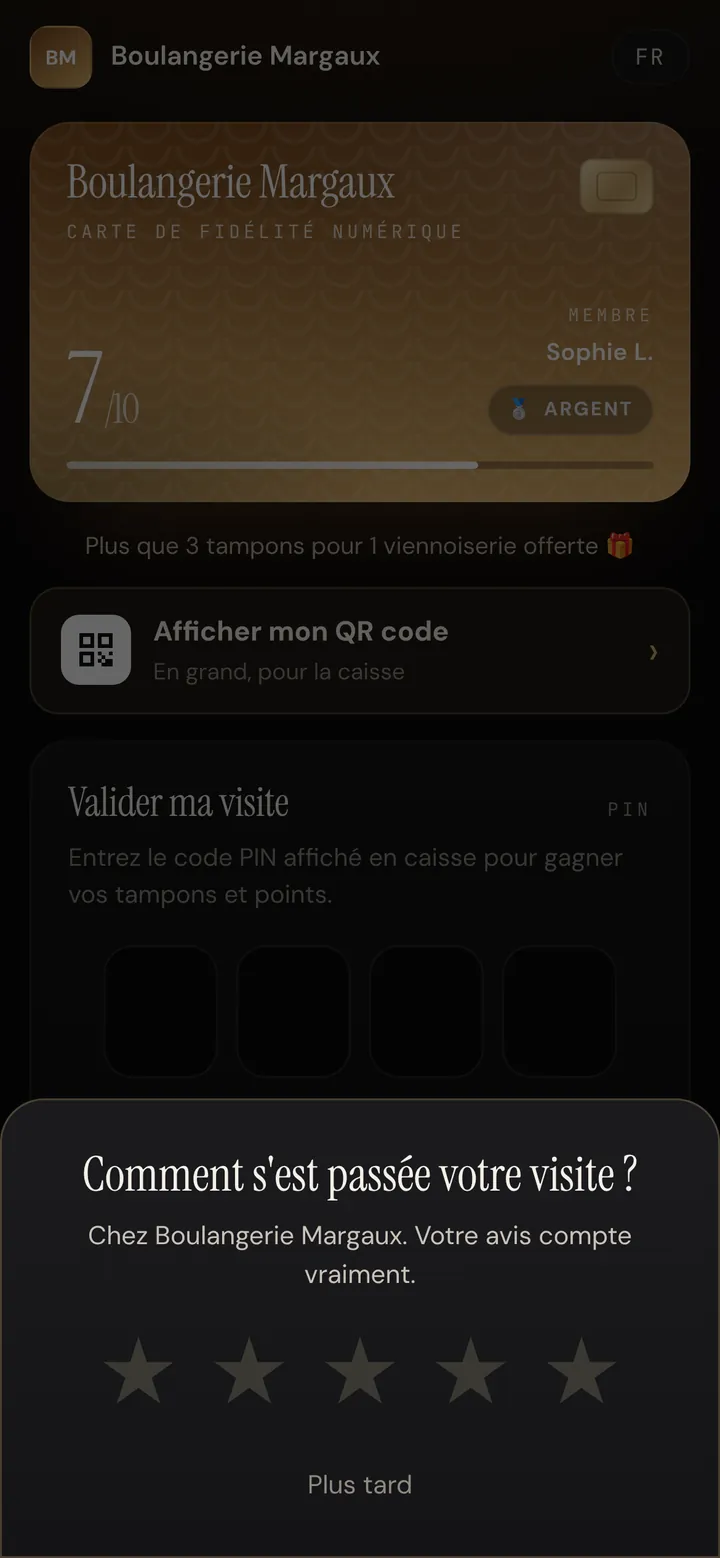
« How was your visit? » window with 5 stars on the customer card
Pro plan

More Google reviews, fewer bad surprises

After a visit, the card asks for a rating from 1 to 5. A happy customer is invited to leave a Google review. A disappointed customer can write to you privately first (they still get the Google link, as Google's rules require).

  • Private messages arrive in your dashboard
  • You see how many customers are sent to Google
  • Paste your Google link once, in the settings
04 — Measure what it earns

Simple figures, in visits and in euros.

fidelpro.app · merchant dashboard
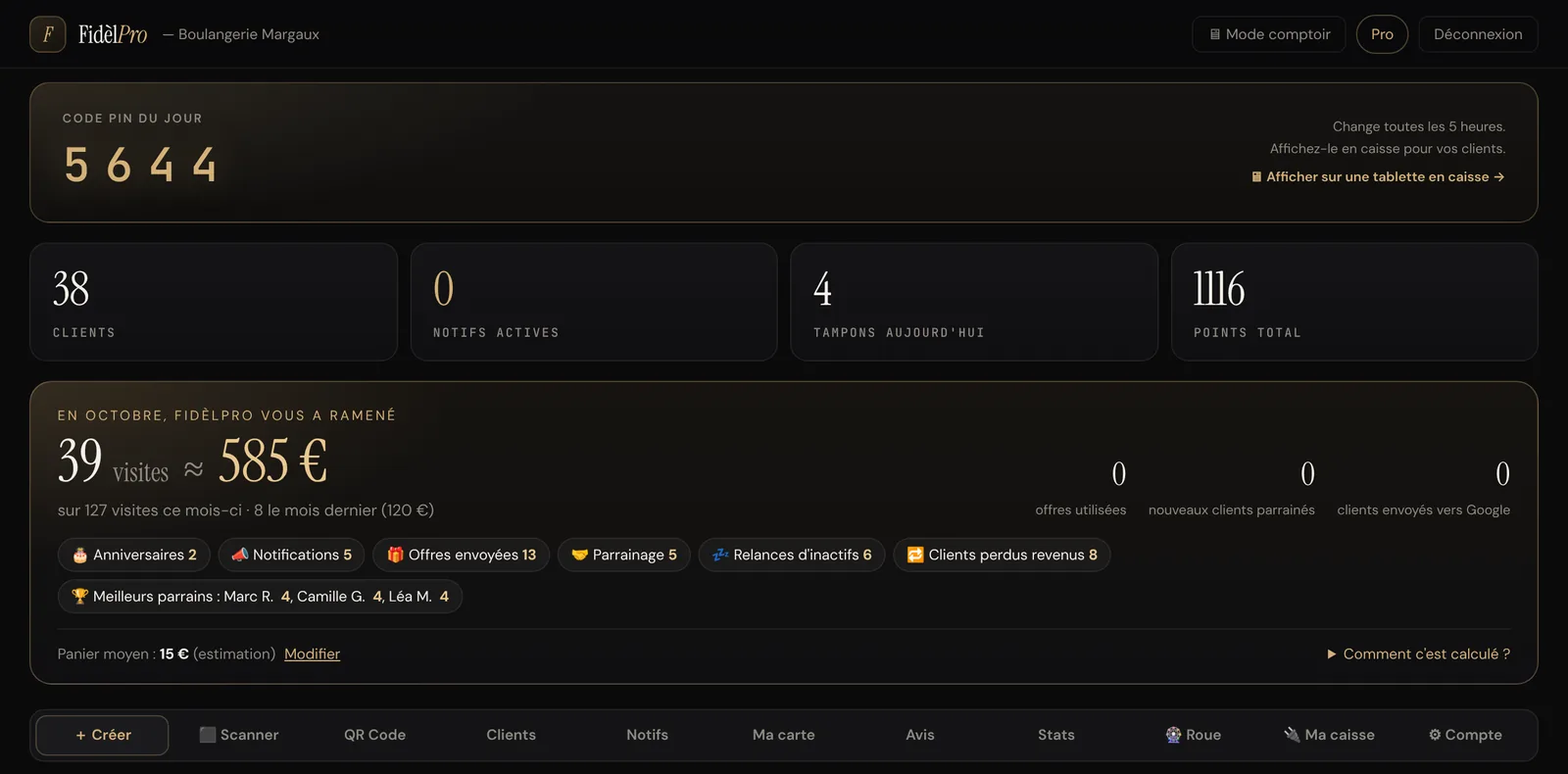
FidèlPro dashboard: « In October, FidèlPro brought you 39 visits, about €585 », broken down by birthdays, notifications, offers, referrals and follow-ups
Pro plan

The results counter, in euros

Every month, the dashboard shows the visits brought back by your notifications, follow-ups, birthdays and referrals, and what they are worth in euros based on your average spend. You know whether the subscription pays for itself.

  • Comparison with the previous month
  • Breakdown by type of action
  • Average spend estimated or real (with the till screen)
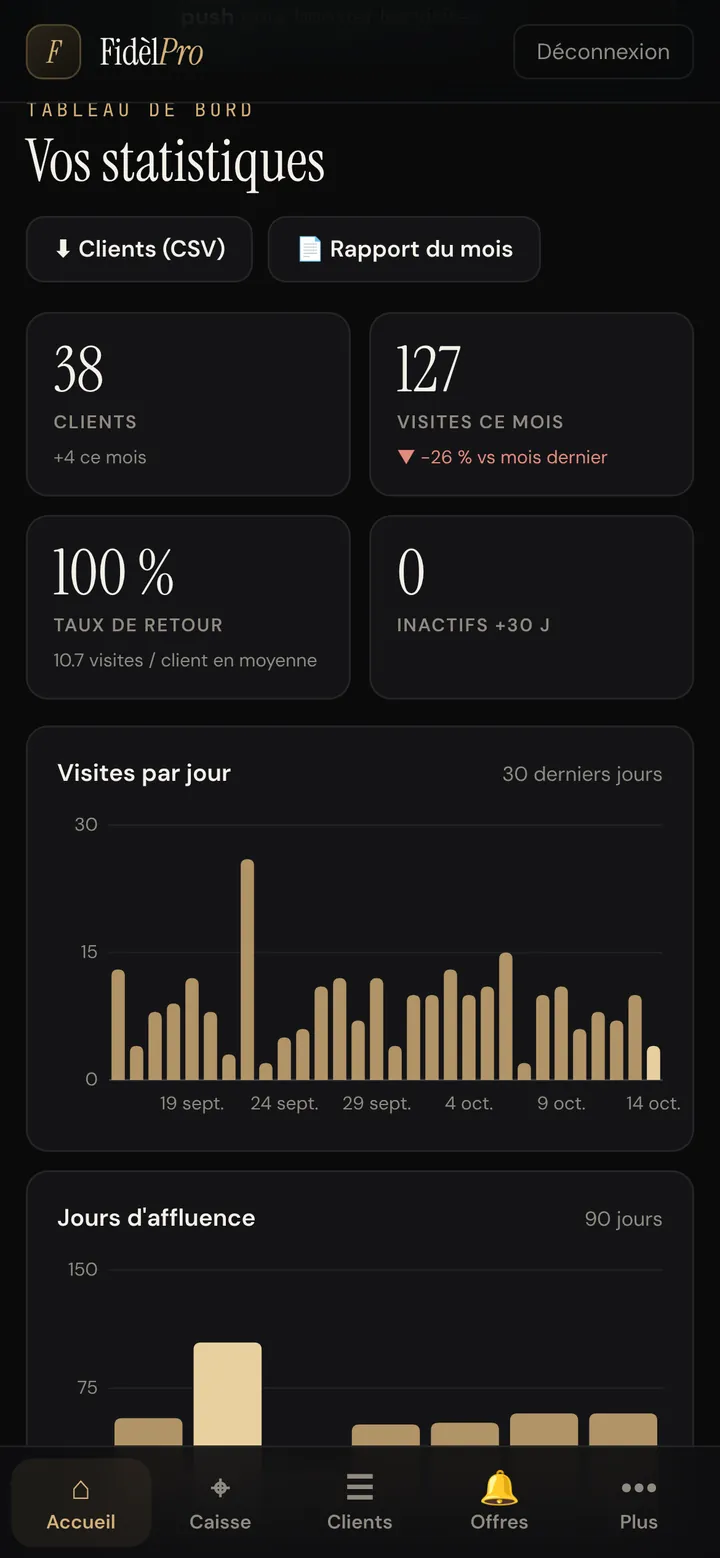
Statistics: 38 customers, 127 visits this month, return rate and a chart of visits per day
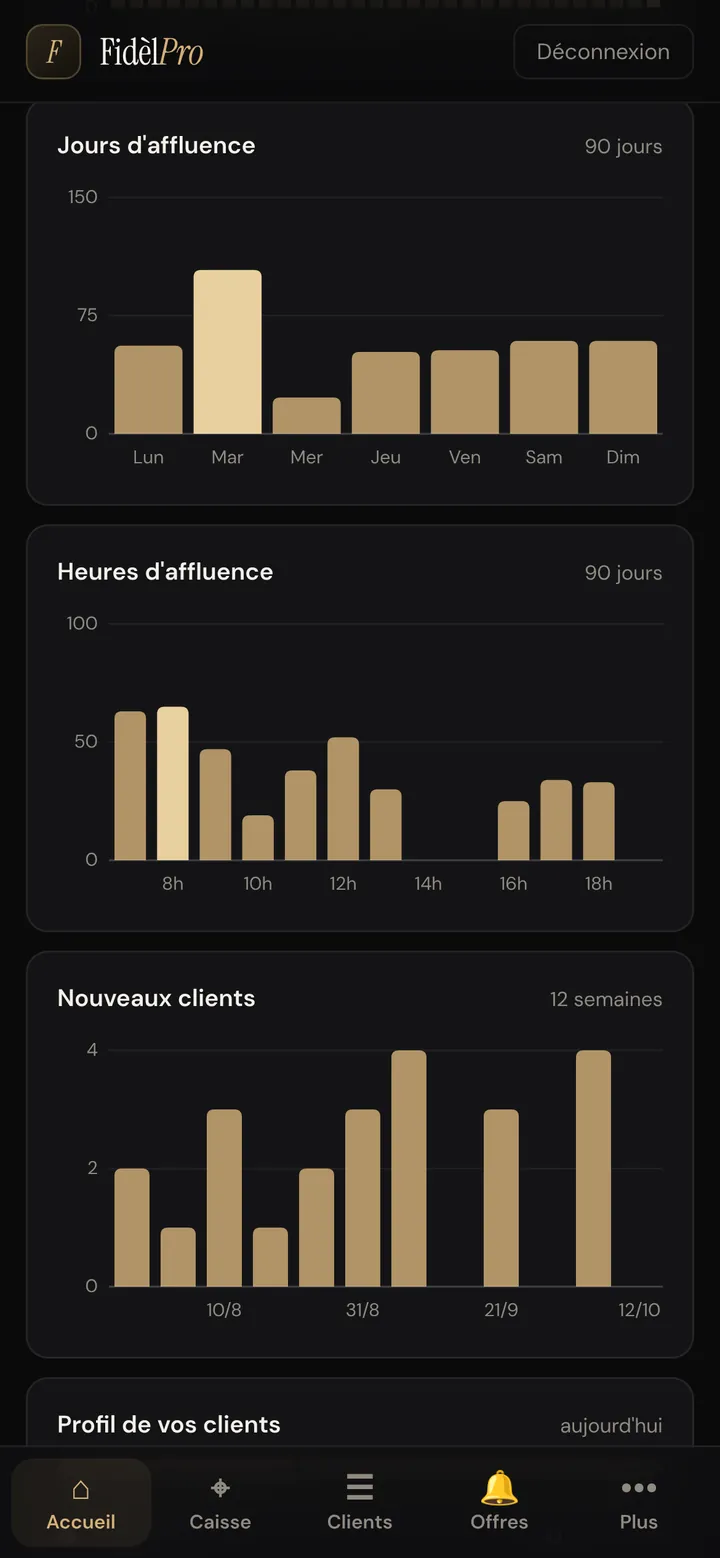
Charts of busiest days and hours over 90 days
Pro plan

Statistics: busy times, loyalty, best customers

Visits per day, busiest days and hours, new customers, return rate, dormant customers, rewards earned and redeemed: everything is calculated from real visits.

  • Monthly report to download
  • Export your customers to CSV
  • List of your best customers
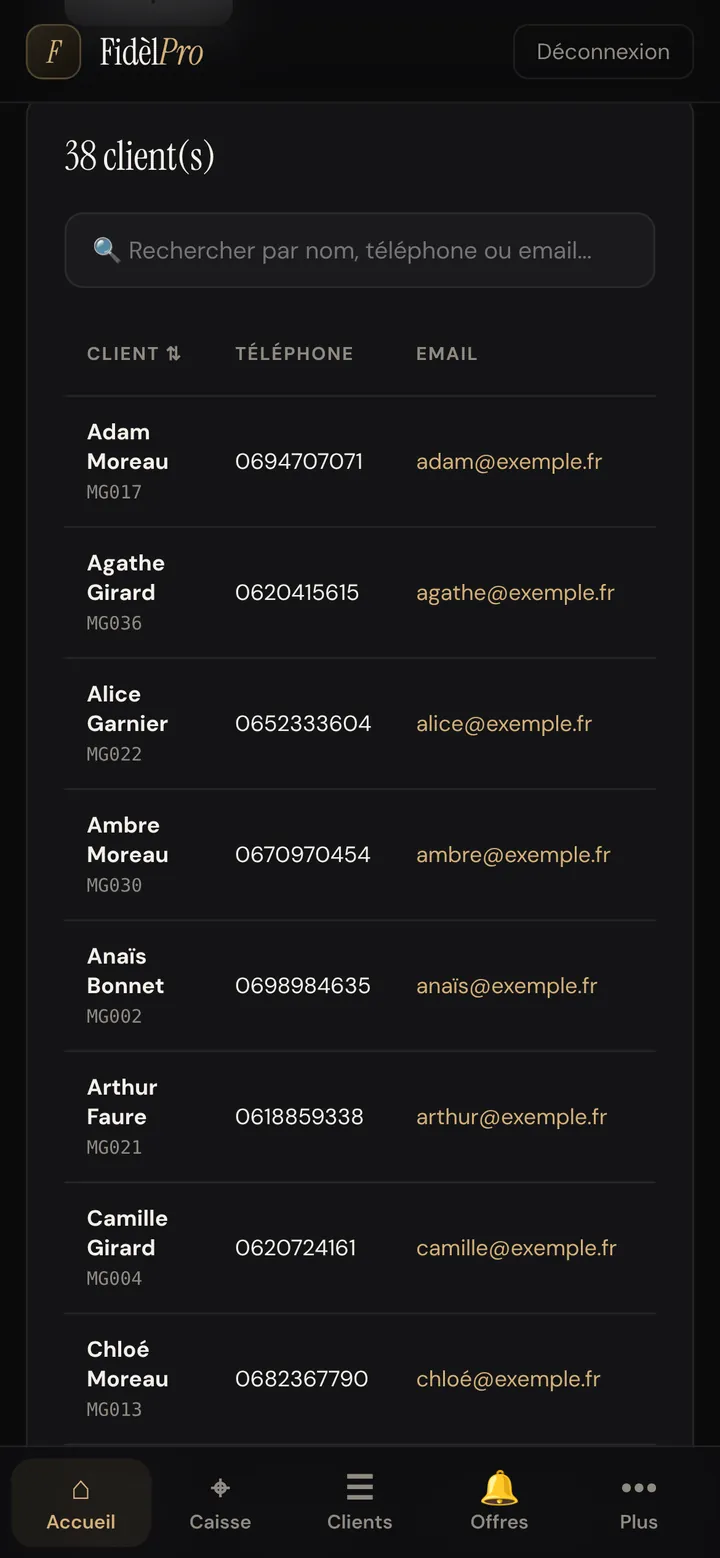
Customer list with name, phone and email, and a search bar
Essential and Pro

Your customer list, finally yours

Every sign-up joins your list: name, phone, email, visits, stamps and points. Find a customer in two letters and send them their card again in one tap.

  • Unlimited customers
  • Search by name, phone or email
  • The data stays yours (GDPR)
05 — Your brand

A card and posters that look like your business.

fidelpro.app · merchant dashboard
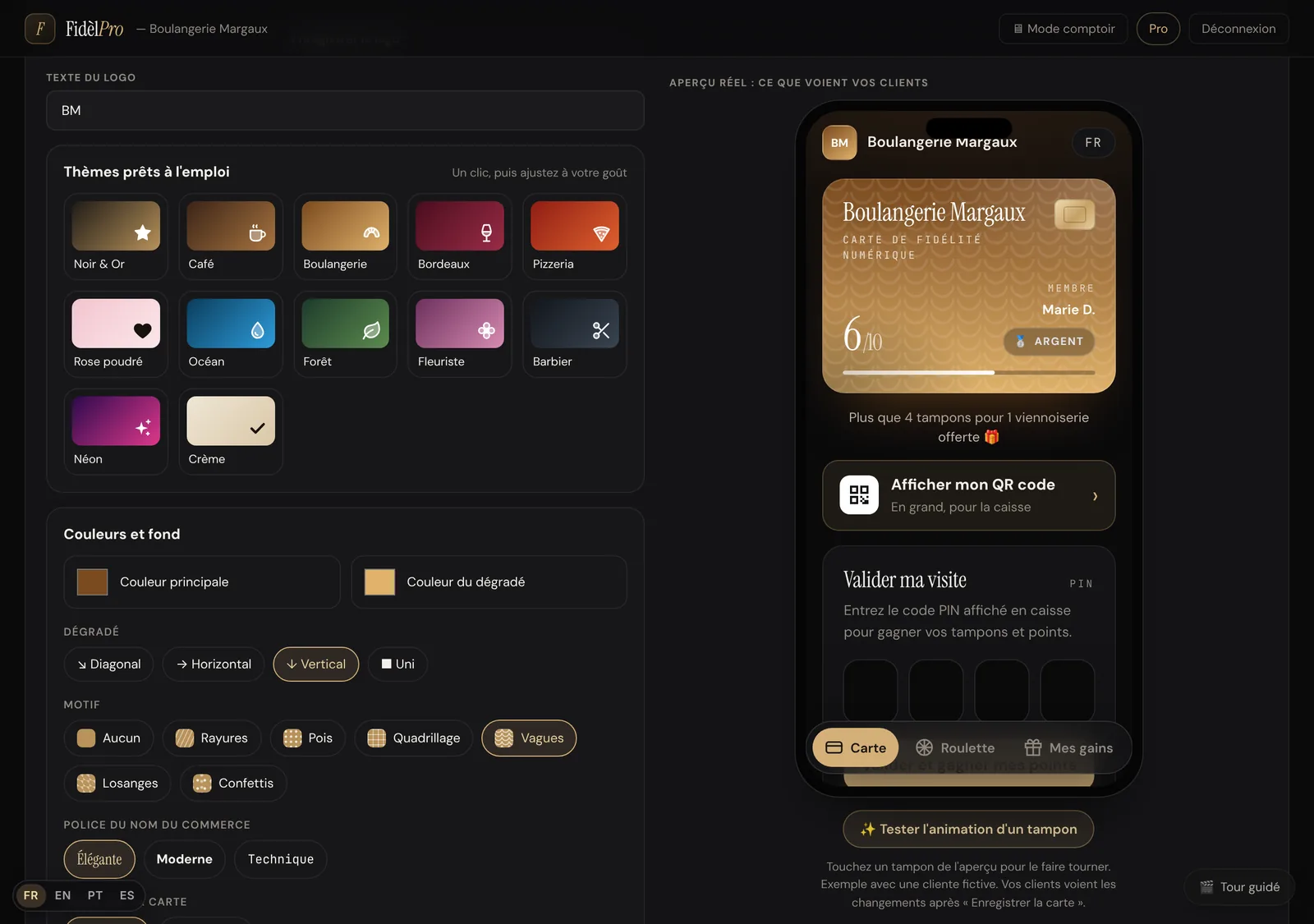
Card editor: ready-made themes, colours, patterns, font, and a live preview of the card on a phone
Essential and Pro

A card in your colours, with a live preview

Logo, colours, gradient, pattern, font, stamp shape and icon, background photo: you see the result on a phone while you adjust. Twelve ready-made themes (café, bakery, pizzeria, barber, florist…) to get started in one click.

  • Real preview, exactly what your customers see
  • More than 25 stamp icons
  • Change it any time, cards update automatically
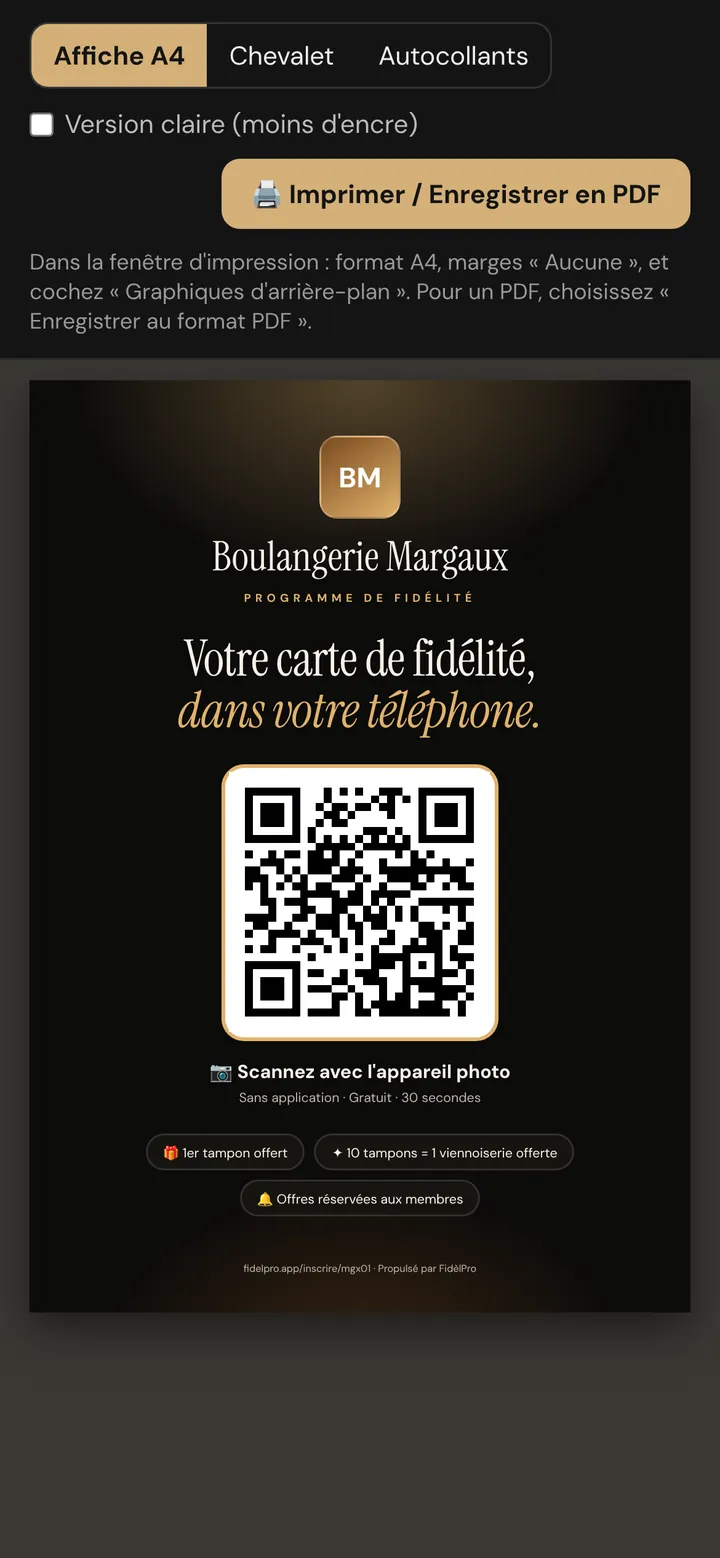
A4 poster « Your loyalty card, on your phone » in Boulangerie Margaux colours, with the sign-up QR code
Essential and Pro

Poster kit ready to print

An A4 poster, a counter tent card and window stickers, in your card's colours and with your QR code. Print at home or save as a PDF for the printer.

  • Light version to save ink
  • Sign-up QR code already in place
  • Install the merchant app on a tablet with a QR code

Real screenshots of the FidèlPro app, with a fictional business and customers.

Essential or Pro?

Essential replaces the paper card. Pro adds everything that brings customers back and measures the results. During the 30-day trial, you get all of Pro.

RoleEssentialPro
Digital card in your colours✓✓
Unlimited customers✓✓
Stamps and reward tiers✓✓
Validation by PIN, QR scan, counter mode✓✓
Single-use reward codes✓✓
Printable poster kit✓✓
Notifications with photo—✓
Flash offers, targeted and scheduled sends—✓
Off-peak hours detected—✓
Google reviews after the visit—✓
WhatsApp referral—✓
Points and wheel of fortune—✓
Birthdays and automatic reminders—✓
Statistics and results counter—✓

Prices and plan details on the Pricing page.

Frequently asked questions

Do my customers need to download an app?

No. They scan your QR code and the card opens in their phone's browser. They can add it to their home screen in one tap, but they don't have to.

Do I need to buy any hardware?

No. Your phone is enough to validate visits. A tablet in counter mode is handy but optional, and FidèlPro can connect to some point-of-sale systems.

Which features are included in Essential?

The card in your colours, stamps and reward levels, check-in by PIN, scan or till screen, anti-fraud reward codes, your customer list and the poster kit. Notifications, follow-ups, birthdays, the wheel, referrals, Google reviews, points and statistics are part of Pro.

Can I try everything before paying?

Yes: a 30-day trial with every Pro feature, no credit card needed. You can also explore the demo without creating an account.

Do notifications cost money like text messages?

No. Notifications go through the customer's card; they are included and unlimited. Only customers who have allowed notifications on their card receive them.

Legal notice · Privacy · Terms of Use · Contact · Features · Pricing · By trade · Guides · Calculator · Free printable card · About · Customer reviews · Report content · Cookies